LaravelLaravel CloudLaravel ForgeWeb DevelopmentBusiness
September 7, 2026
Why I built Wakeavel: let the application sleep until there is work to do
By Vladimir Nikolic
September 7, 2026
By Vladimir Nikolic
I started building Wakeavel because I wanted to move Taskavel from Laravel Forge to Laravel Cloud.
I run several applications, and I wanted a simpler way to deploy and scale them. Cloud's hibernation was particularly appealing: when an application has no traffic and no work to do, its compute can scale to zero.
For a portfolio of small applications, that makes sense. A useful product does not necessarily need a server running every minute of every day.
Then I started looking at reminders.
A reminder might be due at 11:15. Another might be due at 15:00. But a common way to implement reminders is to run a scheduled task every minute, query the database, and ask whether anything is due.
Most of those checks find nothing.
During my migration experiments, I realized that this pattern would undermine the hibernation benefit I was looking for. If the application must wake frequently enough to check for reminders, it may never get a chance to sleep.
Laravel Cloud already understands ordinary scheduled tasks. It captures the schedules reported by schedule:list during deployment and can wake an application when a task is due. Its documentation also explains why schedules at intervals shorter than the sleep timeout can keep the environment awake. Laravel Cloud scheduled tasks documentation
My problem was the work that users create after deployment: remind me this afternoon, send something before this appointment, perform a follow-up tomorrow. Those deadlines belong to application data and can change at any moment.
I initially thought I could gather the day's reminders in one job, perhaps at midnight, and hand them to an external service.
If the only reminders were due at 11:15 and 15:00, the service could call the application at those times. There would be no reason to wake it every minute just to look for them.
But what happens when a user creates a reminder at 10:00 for 13:00?
A list collected at midnight would miss it. The same problem appears when somebody moves or cancels a reminder.
The handoff needed to follow the life of the work.
Existing deadlines could be registered initially. New ones would be registered when created. Changes would reschedule the callback, and cancellations would remove it. The external service would own the waiting; the application would still own the actual job.
That became Wakeavel.
I built Wakeavel as a separate application running on a VPS managed through Laravel Forge.
My Cloud applications tell it when they need a callback. At the scheduled time, Wakeavel sends the request. The application wakes if necessary, handles the work, and becomes eligible to sleep again when Cloud's inactivity conditions are met.
Wakeavel does not put the application to sleep immediately after the request. Laravel Cloud controls that, and ordinary traffic or other work can keep it awake. Laravel Cloud Scale to Zero documentation
This also means Wakeavel does not execute my business logic. A Taskavel reminder still belongs to Taskavel. An appointment reminder still belongs to Meetavel.
I discussed the approach with people on the Laravel Cloud engineering team, including Taylor Otwell. The feedback was encouraging: they understood the problem with frequent schedules preventing hibernation and saw value in the approach.
That conversation gave me confidence to keep building something I needed for my own applications.
I use Wakeavel in Taskavel and Meetavel, and I wanted to check the results rather than assume the architecture must be saving money.
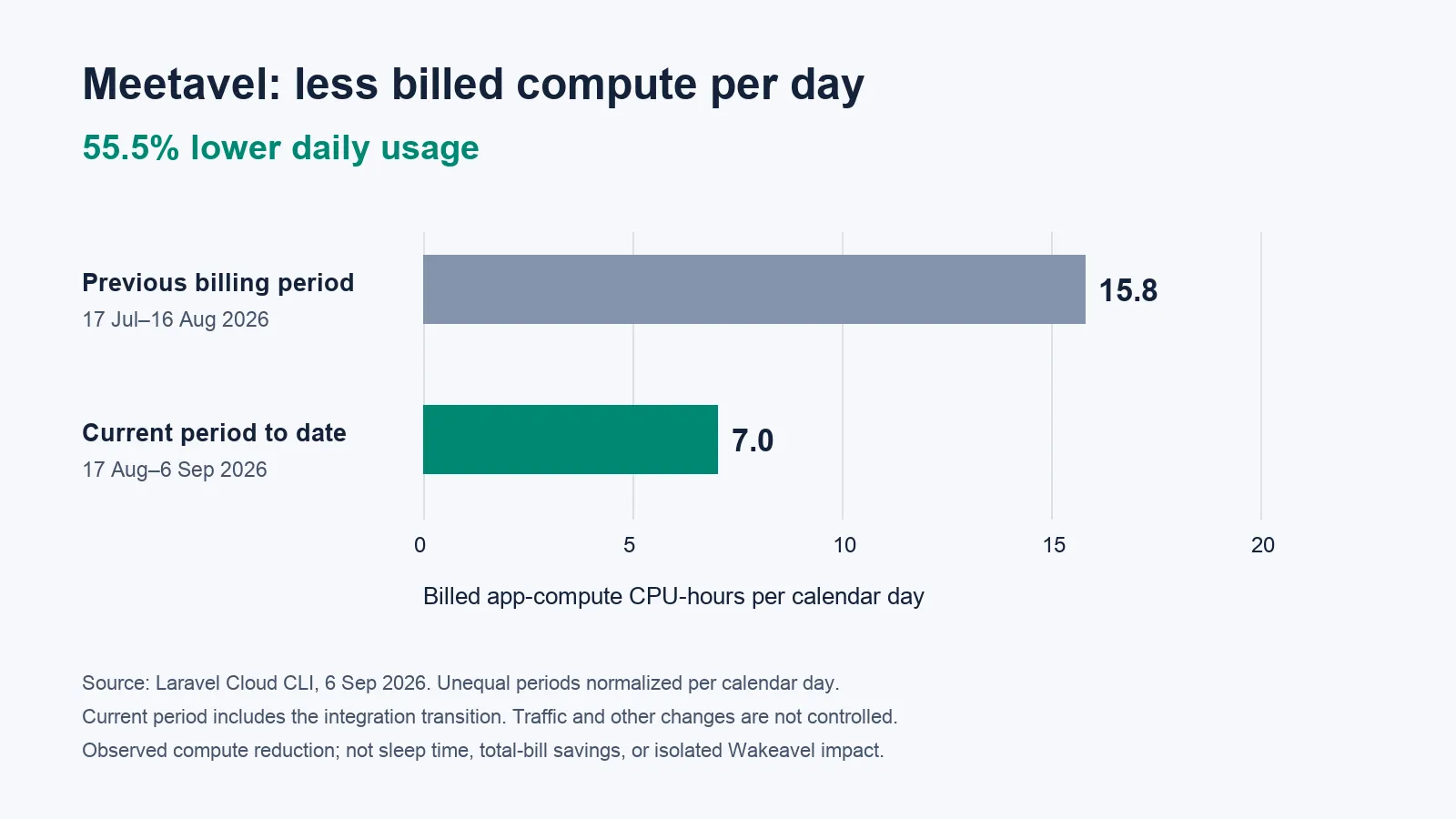
In a Laravel Cloud usage snapshot taken on September 6, Meetavel averaged approximately 7.0 billed app-compute CPU-hours per day, compared with 15.8 in the preceding billing period. After normalizing the unequal periods by calendar day, that is 55.5% lower daily compute usage.
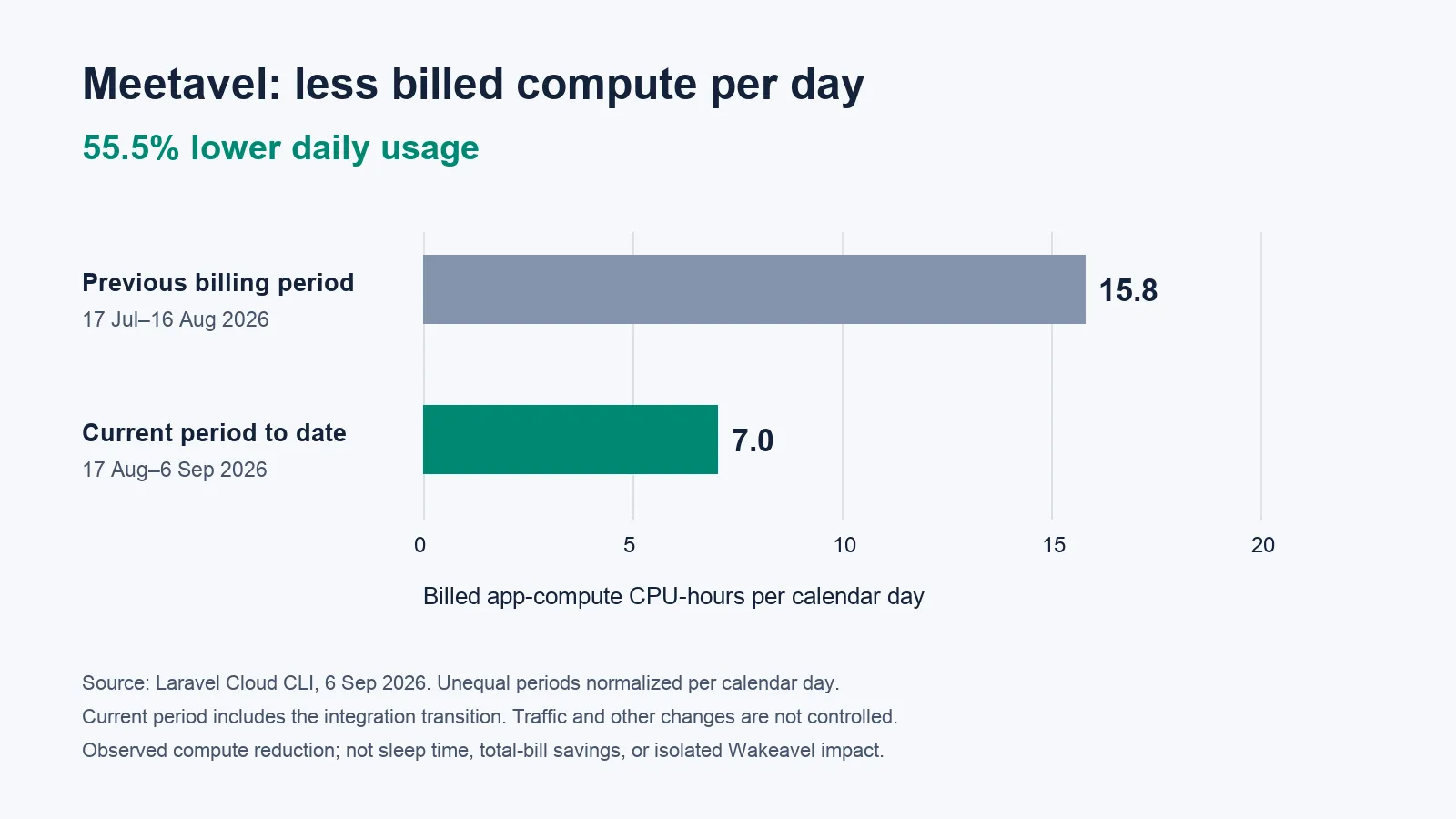
The comparison uses July 17–August 16 and August 17–September 6, through the usage update at 08:35 UTC. The current period includes the integration transition. This is an observation from billing data, not a controlled experiment: traffic and other application changes also affect usage. It is not a claim that Wakeavel reduced the entire hosting bill by 55.5%.
I do not yet have a comparable Taskavel baseline that supports a before-and-after percentage. Its current production environment was created near the end of the previous billing period, so comparing those totals directly would be misleading.
My applications use small compute sizes, so the absolute amounts are modest. I still care about reducing unnecessary work. The useful question is whether the application needs to be running, and what happens when it stops checking for work that is not due yet.
Wakeavel is most relevant when an application has quiet periods but frequently polls for deadlines stored in its database.
That could mean reminders in a task manager, notifications around appointments, or follow-up work created by users. The exact number of reminders is less important than how often the application wakes to discover them, and whether there are useful gaps between real jobs.
An application with steady traffic may remain awake anyway. Moving its reminders elsewhere would not automatically produce meaningful compute savings. Likewise, an ordinary daily schedule may already work perfectly well with Cloud's native scheduler.
Once Wakeavel becomes a paid service, the subscription will need to make sense alongside the compute it avoids and the operational value it provides. A percentage alone cannot answer that question.
I wanted connecting another application to be straightforward, so Wakeavel includes a prompt you can copy into your AI coding agent, along with documentation and manual implementation examples.
The prompt guides the agent through finding scheduled work, registering deadlines, handling updates and cancellations, verifying callbacks, and testing the integration.
There is still application code involved. AI can help write it, but the integration needs to fit the application and be verified. That includes the less visible paths, such as moving an appointment or deleting a reminder.
Those paths matter in my own products too: Taskavel's reminder actions update and cancel the remote schedule, while Meetavel queues those changes after the booking transaction commits.
Wakeavel is currently in free early access, with paid plans intended later.
If your Laravel Cloud application spends its quiet hours checking for work that will only become due later, request early access.
You can also book a Wakeavel integration call with me. We can look at your application and see whether this approach makes sense for its workload.
I built Wakeavel because I wanted my applications to wait more efficiently. They should be ready when there is something to do—and have a chance to sleep when there is not.
Ready to take the next step? Let's work together to transform your ideas into reality. Contact us today to discuss how we can help you create impactful, user-centered solutions that drive success.
Contact Us